
Checking Your Layout
Gauge Buddy checks your layout continuously as you work and lists what it finds. The checks are there to catch the kind of mistake that is cheap to fix on screen and expensive to fix on the baseboard.
The issues list
Click Issues in the toolbar, or press ⌥⌘V, to open the list beneath the canvas.
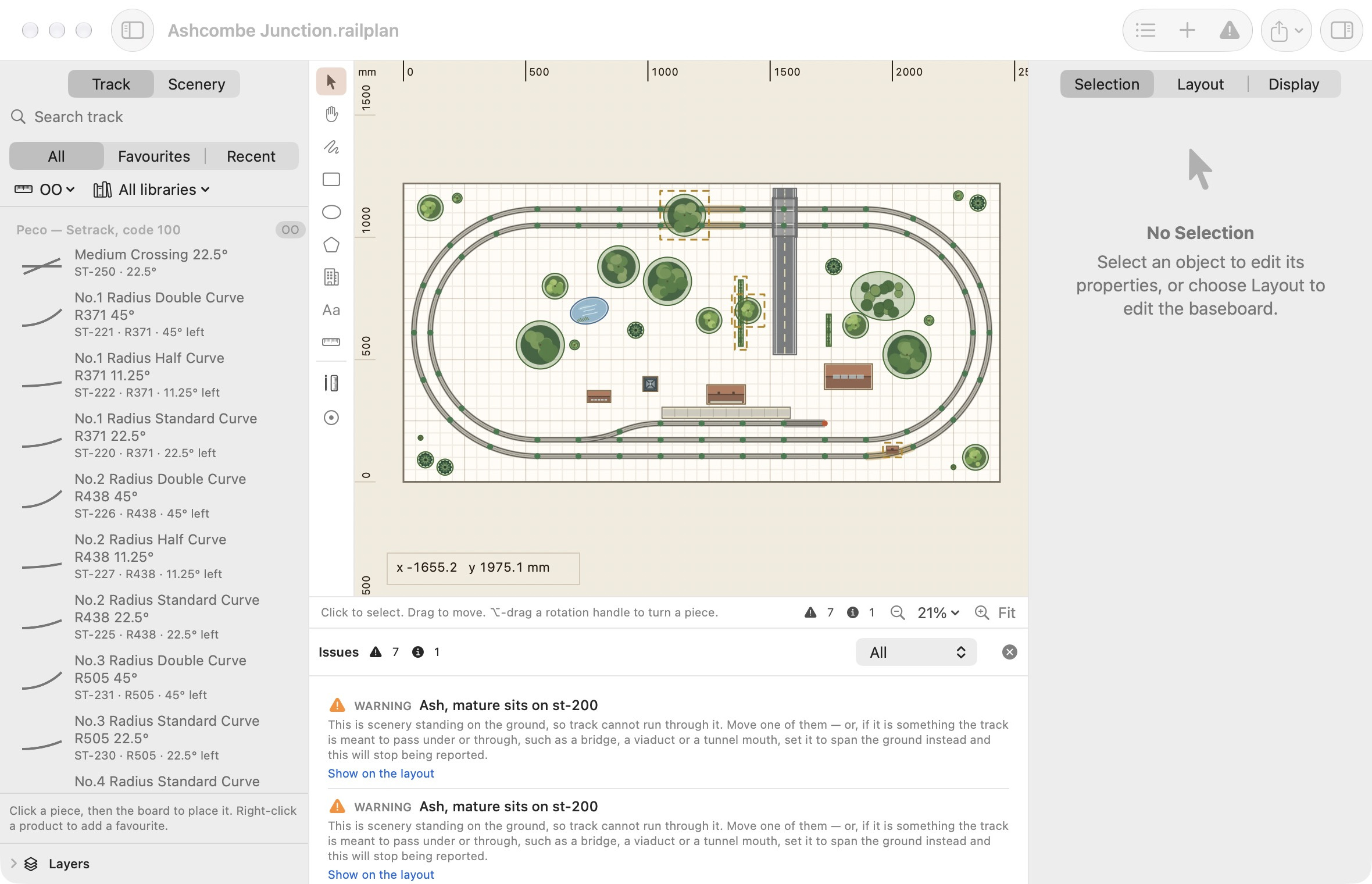
Each issue has a title, a plain-language explanation and, where it helps, what to do about it. Click Show on the layout to select the objects involved and bring them into view. Objects with issues are outlined on the canvas.
The menu at the right of the list filters by severity. The counts are also shown in the status line under the canvas, and the toolbar button changes to a warning triangle when there is something to look at.
Selecting an object shows the issues that concern it in the Validation section of the inspector.
Severity
| Severity | Meaning | What to do |
|---|---|---|
| Error | Something is wrong with the layout itself, such as a missing track library. | Fix it. |
| Warning | Something will probably not build as drawn. | Check it and fix it, or decide it is intended. |
| Note | Something worth knowing that is often deliberate. | Read it once. |
The most common note is an unconnected endpoint. The end of a siding or a headshunt is meant to be open, so this is only a problem if you intended the run to continue.
What is checked
| Area | Checks |
|---|---|
| Track | Unconnected ends, pieces that nearly join but do not line up, overlapping track, curves below the minimum radius. |
| Compatibility | Mixed scales, joints across different track systems, track from a library that is not available. |
| Scenery | Scenery standing on the track, overlapping scenery, scenery sized for a different scale. |
| Boards | Track or scenery outside the baseboard, in a cutout or across a gap between sections. |
| Room | Boards outside the room or touching an obstacle, blocked door swings and aisles. |
| Reach | Areas of the board beyond your reach. |
Every issue type is explained in the Issue Types reference.
Large layouts
On a large layout the checks run in the background so the app stays responsive. While they are running the status line shows Checking…. Exporting waits for the results.
Before you export or print
Exporting and printing are always allowed, whatever the issues list says. The export and print sheets remind you of any warnings first, and a printed PDF records the state of the checks at the time it was made.
What the checks cannot tell you
A clean list is not a guarantee
The checks cover the 2D geometry of the plan: that pieces join, curves respect your minimum radius, and nothing shares the same space. They do not cover:
- gradients, heights or clearances above the track;
- clearance between rolling stock on adjacent tracks, especially on curves;
- manufacturing tolerances in real track;
- wiring, point motors or operation.
Test-fit real track before fixing anything down.