
Scenery
Scenery gives a plan its sense of place, and it also matters practically: a station building takes up room, and a tree in the wrong spot fouls the track.
The scenery catalogue
Open the catalogue and choose Scenery at the top. Items are grouped into trees and ground cover, lineside structures, and roads, bridges and civils.
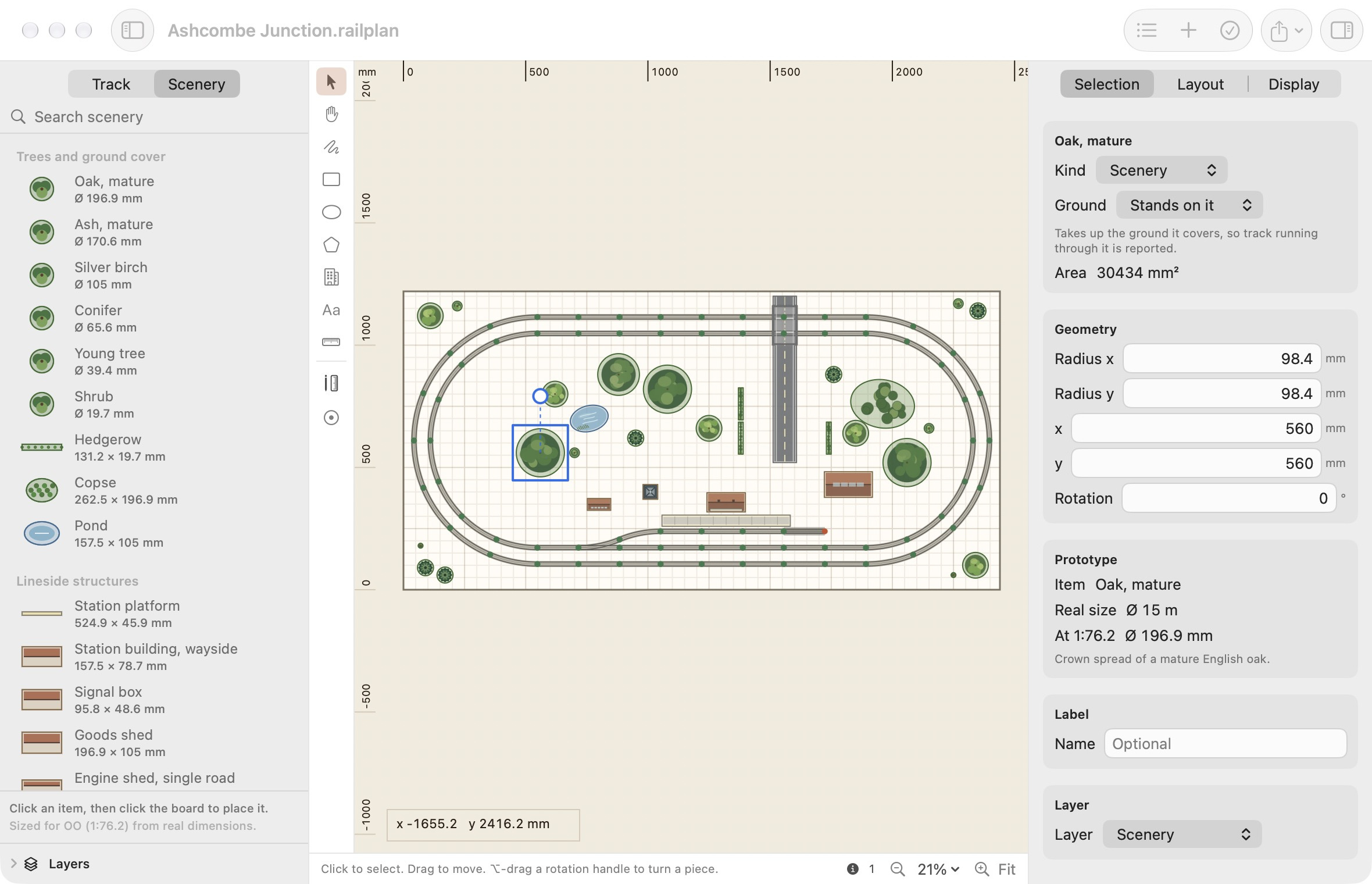
Click an item, then click the board to place it.
Sized for your scale
The catalogue holds the size of the real thing, and works out the model size from your layout's scale when you place an item. A mature oak has a crown about 15 m across, so it is placed at 196.9 mm in OO and 101.4 mm in N.
The Prototype section of the inspector shows where a size came from: the item, its real size, the size at your scale, and what the figure is based on.
The whole catalogue, with sizes in OO and N, is in the Scenery Catalogue reference.
Resizing
Every item can be resized by typing new dimensions in the inspector. If you change a catalogue item's size, the inspector notes that it now differs from its prototype figure. It does not forget what the object was.
Drawing your own
Anything the catalogue does not cover can be drawn with the tools beside the canvas.
| Tool | Key | Use it for |
|---|---|---|
| Rectangle | 4 | Yards, car parks, fields, anything with square corners. |
| Ellipse | 5 | Round or oval features. |
| Polygon | 6 | Irregular shapes. Click each corner and press Return. |
| Building Footprint | 7 | Buildings. These are checked against one another. |
| Text Label | 8 | Names and notes on the plan. |
After drawing a shape, set its exact dimensions, position and rotation in the inspector.
Standing on the ground, or spanning it
Every scenery object has a Ground setting in the inspector.
| Setting | Meaning | Track running through it |
|---|---|---|
| Stands on it | The object takes up the ground it covers. | Reported as an issue. |
| Spans over it | The object passes over the ground: a bridge deck, a level crossing, a tunnel mouth. | Expected, and not reported. |
Spanning objects are drawn see-through with a heavier edge so you can see the track beneath.
The catalogue's level crossing, bridge deck and tunnel portal already span. Trees, buildings, platforms and plain roads do not. A road laid across the rails without a level crossing is reported, because that is a plan that will not build.
What is checked
| Issue | Meaning |
|---|---|
| Scenery in the way of track | Track runs through an object that stands on the ground. Move one of them, or set the object to span if track is meant to pass under or through it. |
| Overlapping scenery | Two objects share the same ground. Buildings are never allowed to overlap, not even one wholly inside another. |
| Outside the baseboard | An object extends beyond the board or into a cutout. |
| Scenery sized for another scale | See below. |
Changing the layout's scale
Scenery is not resized if you change your layout's scale. Gauge Buddy does not alter anything you did not ask it to. The issues list reports which objects were sized for the old scale. Delete and replace them to get the new size, or leave them if the size is what you want.